MCPSpend
A transparent proxy in front of MCP servers that records every tool call and puts a cost on it, per model and per team.
Context
SaaS · developer toolsTeams running agents against MCP servers had no record at all of the cost per call. The bill from the model provider arrived aggregated, at the end of the month, without showing which tool or which client had generated the spend — so it could neither be re-billed correctly to a client, nor used to stop an agent that was consuming abnormally. The cost had to be visible as it is produced, and attributed to whoever caused it.
Architecture
A transparent proxy, not a library to integrate.
It sits between the application and the MCP servers without changing the existing flow, so measuring the spend does not mean rewriting the agents.
Cost is worked out per call, from the payload and the rate of the declared model.
The spend is visible as it is produced, not at the end of the month, when there is nothing left to stop.
Keys are tied to projects, and sessions carry the team or the client.
Re-billing a client has something to stand on, because every call knows who asked for it.
What I built
Transparent proxy
MCPSpend sits between the application and the MCP servers and records every tool call — latency, errors, payload size — without changing the existing flow.
Cost per call and per model
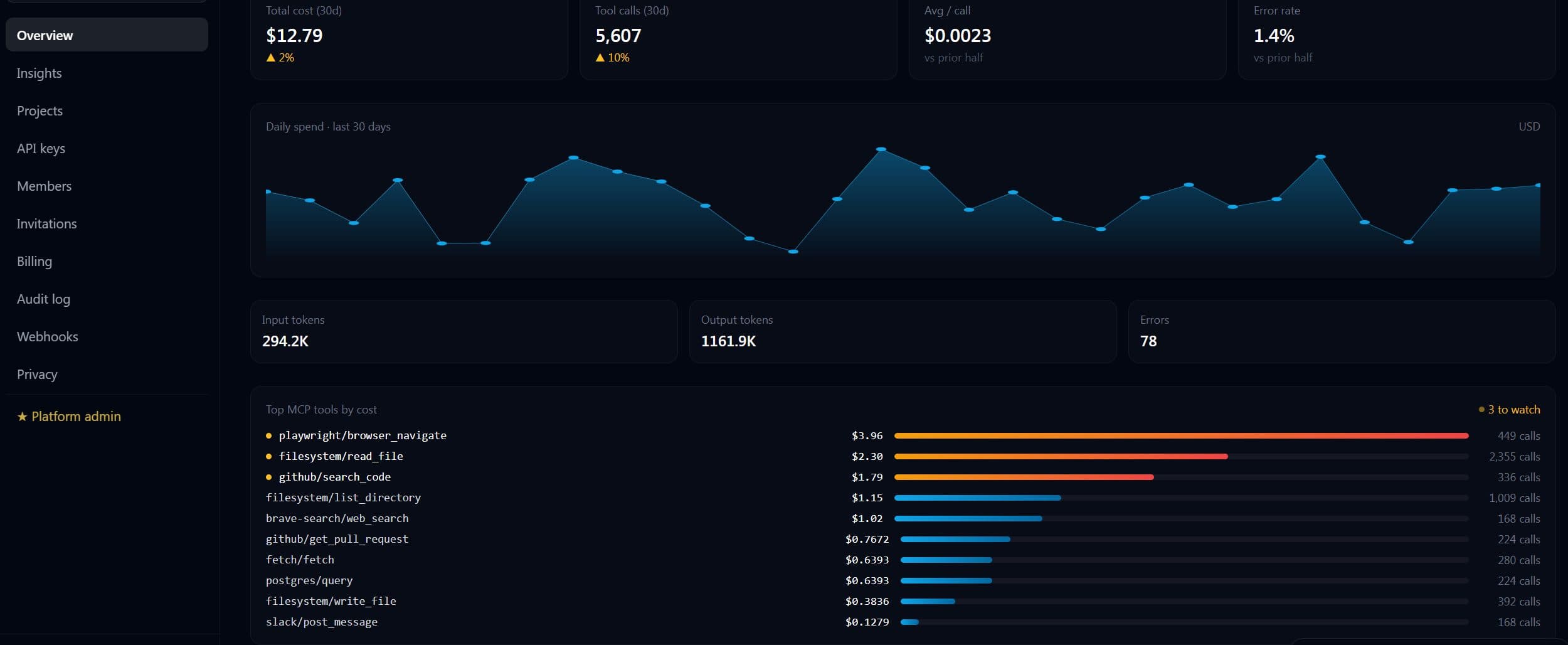
Every tool call is priced from the tokens estimated out of the payload, multiplied by the per-token rate of the declared model; the dashboard shows the daily cost, the error rate and the most expensive tools.
Attribution by team and client
API keys are tied to projects, and sessions can be tagged with the team or the client, so finance can split the cost by either.
Subscription billing
Access is paid for before the account exists, with an email link for the password and instant access to the dashboard; payment goes through Stripe.
How it looks
Stack
Result
- The aggregated end-of-month bill as the only record of the cost.
- Splitting the cost across clients out of estimates.
- The daily cost, the error rate and the most expensive tools are read off one dashboard.
- An agent consuming abnormally shows up on the day it does it.
- Access is paid through Stripe, with the dashboard open right after the payment.
FlowDeskOne
Want something similar?
Describe your workflow and I tell you what would change compared with the project above — and how long it would take.